
If you've built a Flutter app that's more than a "Hello, World!" example, you've faced the challenge of managing state. State is simply the data your app needs to function at any given time. When that data changes, your UI must update to reflect it. This sounds simple, but as an application grows, the complexity of managing state can become a major bottleneck.
What is State?
In Flutter, "state" is any data that can change over time. It's crucial to distinguish between the two main types:
- Ephemeral State: Also known as UI state or local state. This is the state of a single widget, like the current tab in a navigation bar or the completion status of a progress indicator. You can typically manage this with a `StatefulWidget` and `setState()`.
- App State: This is state that needs to be shared across many parts of your app and preserved between user sessions. Examples include user login credentials, shopping cart contents, or notification settings. This is where dedicated state management solutions are essential.
Why a Dedicated Solution?
Relying solely on `StatefulWidget` for app-wide state leads to "prop drilling" (passing data through many layers of widgets) and tightly coupled code that is difficult to test and maintain. A good state management library helps you decouple your business logic from your UI code, making your app more modular and robust.
"The key to managing complexity is to isolate it. State management libraries help us do exactly that by separating our business logic from our UI code."
Popular Solutions: A Quick Tour
The Flutter ecosystem offers many state management solutions. Let's explore some of the most popular ones.
1. Provider
Often recommended for beginners, `Provider` is a powerful dependency injection system built as a wrapper around `InheritedWidget`. It makes it easy to "provide" a value (like a data model) to any widget down the tree. It often uses a `ChangeNotifier` to notify listening widgets when data changes.
// A simple counter model using ChangeNotifier
class Counter with ChangeNotifier {
  int _count = 0;
  int get count => _count;

  void increment() {
    _count++;
    notifyListeners(); // This tells listening widgets to rebuild.
  }
}
2. BLoC (Business Logic Component)
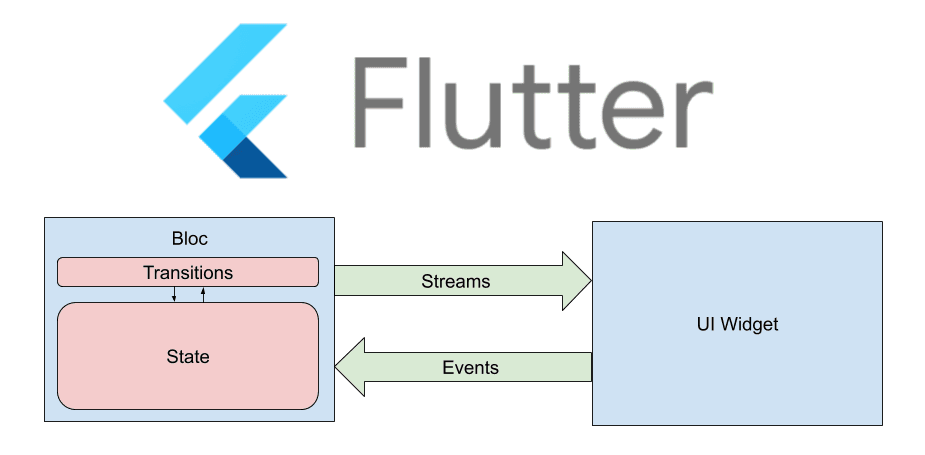
BLoC is a more structured architectural pattern that separates business logic from the UI using streams. Events are dispatched from the UI, processed in the BLoC, and new states are emitted back to the UI in response. It enforces a unidirectional data flow, which makes your app's behavior highly predictable and easy to test.
While BLoC has a steeper learning curve, its strict separation of concerns makes it a favorite for large-scale, complex projects where maintainability is a top priority.
Conclusion
There is no "one-size-fits-all" solution. For simple, local state, `StatefulWidget` is perfectly fine. As your app grows, `Provider` offers a gentle learning curve with powerful features. For maximum scalability and testability in complex apps, `BLoC` provides a robust, predictable architecture. The best choice depends entirely on your project's complexity and your team's familiarity with the patterns.